In House ECU Software Logistics
Overview
This document is the introduction for the in-house ECU software [AppLogisticsData.json] setup.
- Author
Shan Deng
- Date
Nov 01, 2021
- Version
7.4.0
Instruction
For all In-House ECUs, ECU tracker will read detail software information from the software zip file while building the software from ECU tracker.
After adding a new software into ECU tracker, the [Built] field should be marked as [False], which allow ECU tracker to call the Jenkins build job of the ECU Release Candidate to build the software.
In the software zip, a JSON file named [appLogisticsData.json] shall be included, which will allow ECU tracker to read detail information of the software(s) into the database.
Note
Each software zip should have one [appLogisticsData.json] file which can include multiple software entries.

Field Structure
The following fields are used in software logistics JSON file.
Field Single |
Field Multiple |
Required |
Description |
|---|---|---|---|
VER_MAJOR |
Required |
The Major version number |
|
VER_MINOR |
Required |
The Minor version number |
|
JENKINS_BUILDNUM |
The build number of the Jenkins job |
||
BUILD_DATE |
The time of the Jenkins job |
||
BUILDER_ID |
Required |
||
BUILD_TIME |
|||
VER_SUBMINOR |
VERS_SUBMINOR |
Required |
The Subminor version number of each |
RCNum |
Required |
The RC number of building |
|
PROJECT_ID |
Required |
||
OWNER |
|||
APPLICATION_TYPE |
The zip app type |
||
APPLICATION_TYPES |
APPLICATION_TYPES |
Required |
|
COMPONENT_NUMBER |
COMPONENT_NUMBERS |
Required |
The component number of each |
PART_NUMBER |
PART_NUMBERS |
Required |
The software part number of each |
FLASHING_LEVEL |
FLASHING_LEVELS |
Required |
|
START_STRING |
START_STRINGS |
Required |
The software start string of each |
DESCRIPTION |
DESCRIPTIONS |
The description of each |
|
GIT_HASH_10 |
|||
autogen |
Software Version Format
Note
SoftwareVersion = {VER_MAJOR:02}.{VER_MINOR}.RC{RCNum}.{VER(s)_SUBMINOR}.{BUILDER_ID}
The software version will be redefined and update to the database based on the JSON logistics file.
Single Software Format
To define a single software component (one Hex file) example
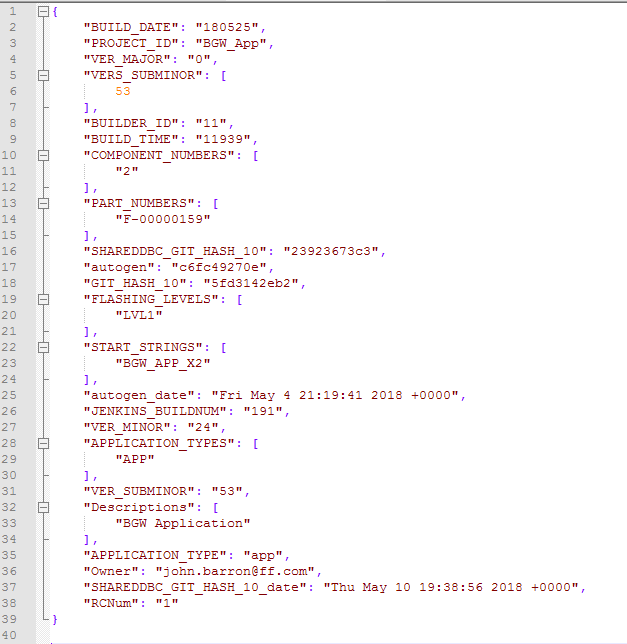
Check the result software updates in the ECU Tracker.

Multiple Software Format
To define multiple software components (one Hex per component) example.
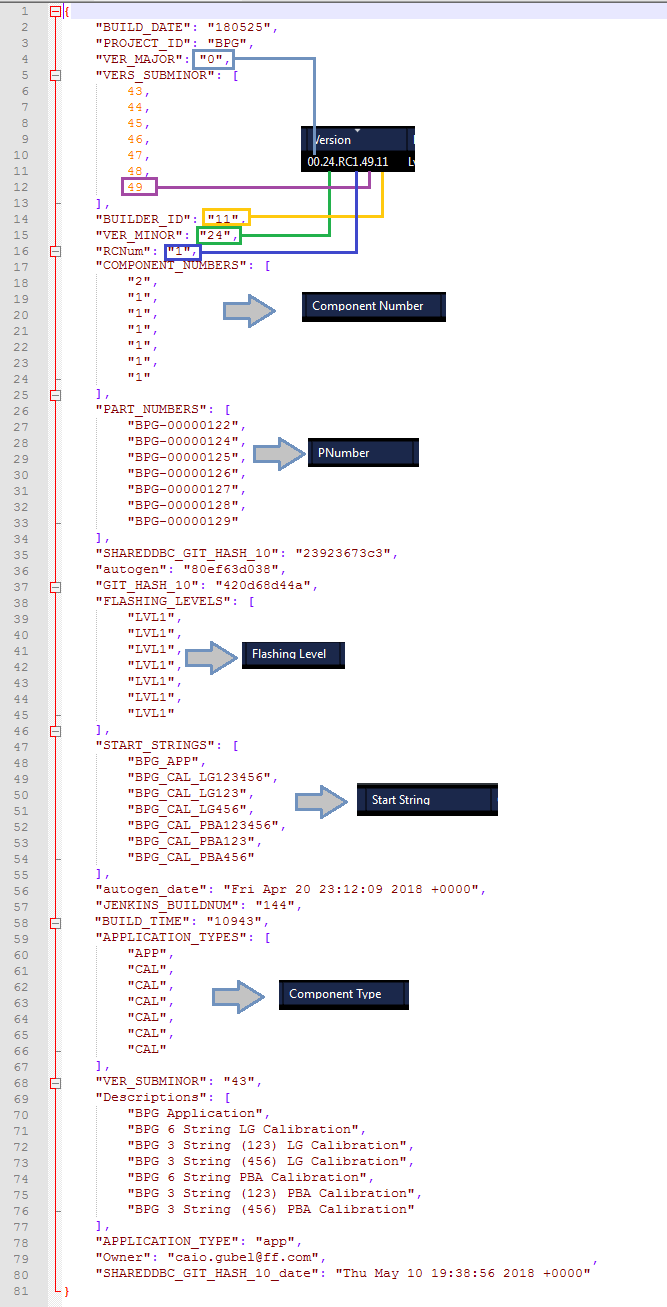
Check the result software update in the ECU Tracker.

- ComponentTypes
Component type options
All |
Full package in one file |
APP |
Main application |
APP2 |
Second application |
APP3 |
Third Application |
BL |
Bootloader |
BL2 |
Second Bootloader |
BLU |
Bootloader Updater |
CAL |
Calibra**tion |
CAL2 |
Second Calibration |
CAL3 |
Third Calibration |
ODX |
Diagnostic Type |
err |
Bad Choice |
- FlashingLevels
Flashing level options
ADB |
Android Processes (NON OTA) including fastboot |
JTAG |
JTAG |
Lvl1 |
Compliant No Seed and Key |
Lvl2 |
Compliant Default Seed and Key |
Lvl3 |
Compliant Full Security |
NotC |
Non-Compliant Bootloader |
Read |
Version can be Read but not Flashed |
SWOTA |
OTA Android or QNX process zip files (NOT FOR UDS/HEX files) |
ODX |
Diagnostic Type |
err |
Not filled correctly |
None |
None |