Email Sender
Overview
This document shows how to use the built-in email tool of ECU Tracker.
- Author
Shan Deng
- Date
Nov 01, 2021
- Version
7.4.0
To Start
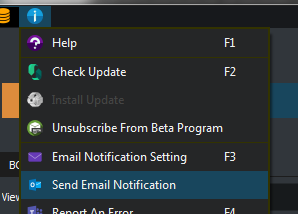
Click the information menu button > ‘Send Email Notification’.
Select Receipts
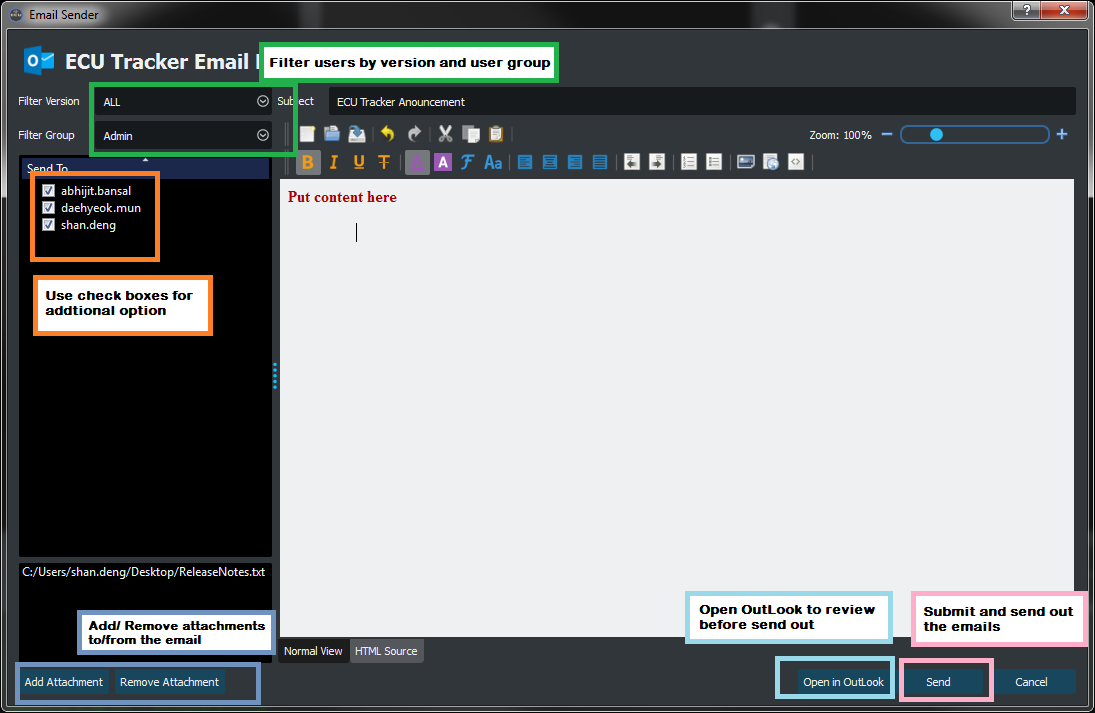
Use the Version & Group filter to filter the user list of ECU Tracker.
Note
Both filters are multi-select enabled, use ‘ALL’ entry to select/deselect all options
Use check box as additional filter for target receipts.
Attachments
Use attachment buttons to add/remove attachment to the email.
Send Email
Use [Open in OutLook] to review the email in OutLook before send out.
Use [Send] to send the email without reviewing it.
Note
The ECU auto populating requires loading database before editing. A ECU name prefix will be automatically added to the list name.