Generate OTA Configuration CSV
Overview
This document shows how to generate OTA Configuration CSV file
- Author
Daehyeok
- Date
Nov 01, 2021
- Version
7.4.0
To Start
To generate file, go to .
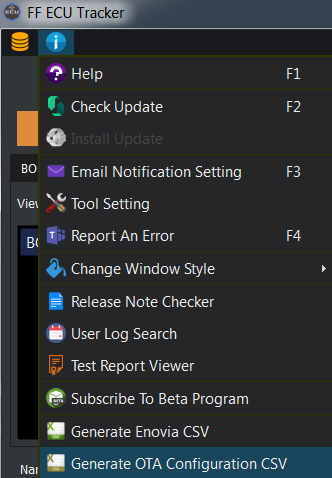
Generate OTA Configuration CSV Window
Below window will be pop upped to select OTA Configuration CSV option.
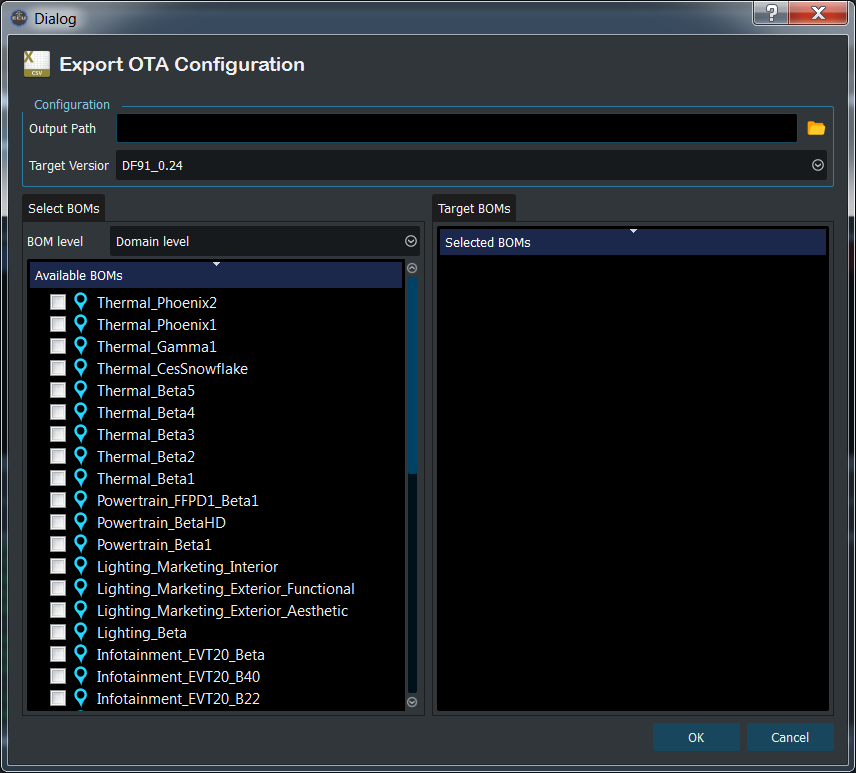
Output Path - Folder path to save generated CSV files.
Target Version - Select package version to extract software information.
Select Boms (Optional) - Select Boms if you want to extract information which only included in specific BOMs. Otherwise, all of the software which included in Target version will be written to file.
Generated CSV Files
CSV files will be saved in the selected output path. Name of files is following a rule.
OTA_Status_{Target Version}.csv - If user didn’t select any BOMs
OTA_Status_{Target Version}_{BOM name}.csv - If BOMs are selected, ECUTracker will create files as much as the number of selected BOMs.